“How do you handle having so much to do?!”
That's a question I get from many of the people I meet when they ask about my work. I run three businesses and volunteer in multiple organisations. I'm juggling a lot.
But the reason I can get so much done is that I use systems. Some are for organising my work, some are for decision making, and some are for communication.
My communication systems have been given a huge boost by one simple change that I made a few years ago. I stopped writing so many emails and having so many meetings, and started using video instead.
What is the worst time-drain in your day?
I bet it's either emails or meetings.
It's amazing how much time it takes to write certain kinds of emails. And meetings can last longer that anyone expects – even a simple phone call that should have been 5 minutes can take 15 when other topics get brought up “just while I've got you…”.
Before you know it your plans for the day are disrupted… because of emails and meetings.
But there is a way to resolve this and buy back huge chunks of time each week. First, when meetings are essential, don't waste time playing calendar tennis. And second…
Use video to replace emails and meetings
One of the most effective tools in my communication system is Loom.
That's my affiliate link, but feel free to look up Loom on Google and go direct if you'd rather not use it.
Here's a Loom to explain how I use it:
At its simplest, a Loom video can replace a meeting or an email just by showing what would have otherwise been written or discussed in person.
Why Loom is such a great video tool
Check out the Loom website for all the details, but here are some of the features I really appreciate:
- It uploads as I record, so there's no delay or extra work involved in sharing. The second I've finished recording I can fire the link into an email (it's already copied to the clipboard ready to go) and I'm done.
- The transcript is auto-generated, and it removes all my umms and aaahs.
- It's easy for the recipient to react or leave a comment in response right on the video.
- I can add “jump links” to create a table of contents for the viewer to get right to the part they need.
- I can see when the video has been watched, so I know if I need to chase up.
Examples of video saving hours of time
Asynchronous communication
There are so many benefits to using video, but one of the most helpful for me is the way it enables asynchronous communication. I can send a fully detailed video that captures everything I want to get across, and the recipient can send one back. We could be in opposite timezones, or just working different hours, but the communication can continue unhindered, as if we were meeting in person or jumping on a video call and sharing a screen.
Some projects have lots of time between meetings where nothing can proceed because it needs discussion, and that means a video call with a screen share or an in-person meeting with travel time and costs. Asynchronous communication using video transforms that situation and can save insane amounts of dead time between meetings. Rather than waiting for the stars to align so we can get time in our calendars to meet, we can send videos back and forth and keep moving forward.
Freelancers
I work with a lot of different freelancers, and the key to a successful freelance project is having a clear brief. There's nothing better than a video brief with clear narration to show, as well as tell what needs to be done.
It's far better than any amount of text and screenshots because the freelancer is seeing exactly what needs done, in context. And it takes 5 minutes instead of closer to an hour to create a briefing document with the equivalent level of detail where everything would need to be described. The freelancer can reference the video as often as they need to, and skim through the automatic transcript if they need a written version.
This is especially good for freelancers where English is not their first language – if they don't understand every word I've written or spoken they can see what I mean and it all makes sense.
Sales
Using Loom has been a boost to my sales systems. I've used quick videos to introduce myself, give quick audits of websites, or show a demo to answer a question from a prospect.
The great thing about this is that the prospect is meeting me, and I can convey my personality and start to build a relationship. It's highly personal, as I recorded the video specifically for them. It looks like I've taken a lot of time and trouble, but ironically it probably took me less time than composing the equivalent email!
Training and handover
I create simple training videos every time I hand over a website or a system that I and my team have built. Loom has a great feature where a single shared link to a “folder” can be provided to the client, and in it they find a whole library of videos, neatly labelled and ready to go.
Another really useful feature is the ability to put time-based jump links in the video description, to create an interactive contents page:
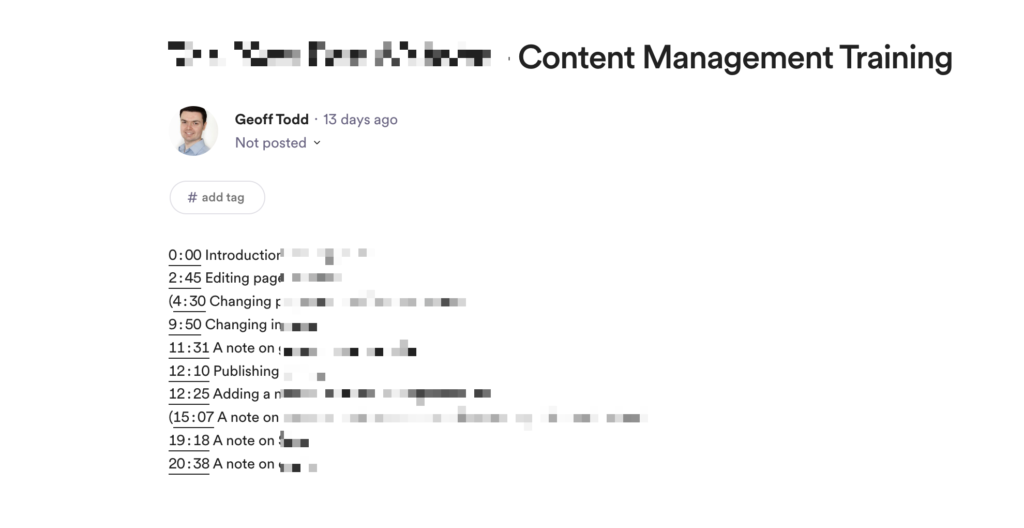
This is super helpful, as users can review just the short section that they need, rather than having to scroll through the entire video looking for something.
And the best part?
It's free! You can use Loom without paying anything. It's restricted to 5 minute videos and you can only store a set number of active videos at any one time, but that may be enough for you.
If you do need to upgrade, it's not expensive, especially if you pay annually.
Ok, that's enough of a pitch from me. Go try it for yourself!